How I automated the gap between “having a plan” and “following the plan” — using an AI planner, a markdown vault, and a file watcher.
The Gap Nobody Automates
There are thousands of productivity tools. Calendar apps, task managers, habit trackers, Pomodoro timers, note-taking apps, and AI assistants. I’ve tried most of them.
They all break at the same point: the handoff.
You plan in one place. You work in another. And between the two, there’s a gap where good intentions go to die. You wrote a beautiful time-blocked schedule at 8 am. By 10:15, you’ve forgotten it exists.
I use Obsidian for everything — project notes, weekly goals, meeting minutes, and daily plans. It’s the best thinking tool I’ve found. But thinking and doing are different activities. Obsidian is exceptional at the first and silent about the second.
What I wanted was a system that could:
- Read my notes, goals, and yesterday’s leftovers
- Generate a realistic daily plan — time-blocked, context-aware
- Watch that plan file all day and remind me when it’s time to switch tasks
No manual prompting. No copy-pasting. No switching between apps to check what’s next.
So I built it.
The Three-Tool Stack
The system has three components, connected through plain markdown files:
Claude (planning agent)
↓ writes
Obsidian Vault (source of truth)
↓ watched by
DayWatch (notification engine)
Claude: The Planner
Every morning at 8 am, a Claude Cowork scheduled task runs against my Obsidian vault. It reads:
-
My weekly plan (goals, priorities, commitments)
-
Yesterday’s daily note (what got done, what didn’t, any notes I left for tomorrow)
-
My calendar (via Google Calendar MCP)
-
Any flagged items from project notes
From this context, Claude generates a time-blocked daily plan in markdown:
markdown
## Day Planner
- [] 08:30–09:00 planning & review
- [] 09:00–11:00 deep work: API refactor
- [] finish auth middleware
- [] write integration tests
- [] 11:00–11:45 gym
- [] 12:00–12:30 lunch
- [] 12:30–13:00 email & slack triage
- [] 13:00–15:30 project work: DayWatch release
- [] 15:30–16:00 Swedish practice
- [] 16:00–17:00 reading & review
This file lands in my vault at plans/2026/03/2026–03–26.md. It’s just a markdown file. I can edit it in Obsidian, tweak the times, add tasks, and check things off as I go.
The key insight: Claude isn’t generating a generic schedule. It’s reading my actual context — what I committed to this week, what I failed to finish yesterday, what meetings are on my calendar — and producing a plan that accounts for all of it. The quality of AI-generated plans scales directly with the context you give them.
Obsidian: The Source of Truth
Everything lives in the vault. Plans, notes, goals, templates — all plain markdown, all version-controlled, all searchable.
Obsidian is the hub that both Claude and DayWatch connect to. Claude reads from it and writes to it. DayWatch watches it. I edit it. Nobody needs an API. Nobody needs a sync service. The filesystem is the API.
This is deliberate. I’ve been burned by productivity tools that lock your data behind proprietary formats or cloud services. When the company pivots, raises prices, or shuts down, you lose everything. Markdown survives.
DayWatch: The Accountability Layer
DayWatch is the piece I had to build because it didn’t exist.
It’s a system tray app (800 lines of Python) that watches my daily plan file and sends native desktop notifications when time blocks are about to start. Click the tray icon and you see your day at a glance:
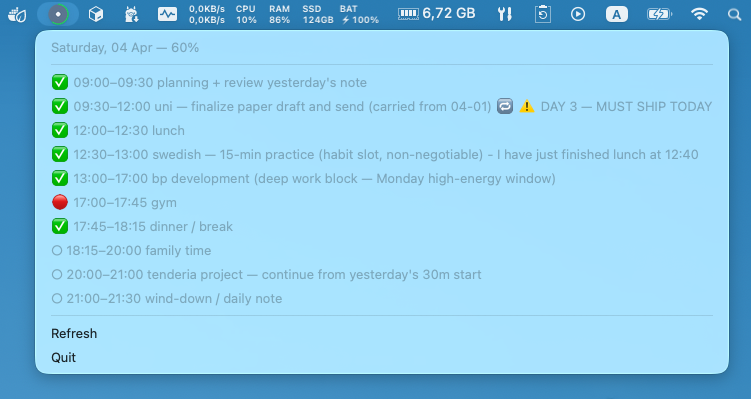 Example of a daily plan. (PS: My Saturdays don’t look like this 😅.)
Five minutes before each block starts: a notification. When the block starts: another notification. If I launch the app mid-block: an immediate “you should be doing X right now” notification. If I edit the plan in Obsidian: instant reload, rescheduled notifications.
It’s built with Claude Code, which is ironic and appropriate — Claude plans my day, and Claude built the tool that enforces the plan.
Why This System Doesn’t Exist Yet
I searched extensively before building DayWatch. Here’s what’s out there:
Obsidian Day Planner plugin — adds a visual timeline to your daily notes. Great for seeing your schedule. Doesn’t send notifications. The plan stays inside Obsidian; if you’re not looking at Obsidian, you’re not looking at your plan.
Obsidian Reminder plugin — sends notifications for tasks annotated with @date reminders. Closer to what I needed, but requires you to manually tag each task with a reminder time. It doesn’t understand time block ranges (08:00–09:00) — only individual timestamps. And critically, it only works while Obsidian is open. Close Obsidian, and your reminders stop. There’s no standalone tray presence, no progress tracking, and no “coming up in 5 minutes” lead notifications.
NotePlan (~$108/year) — the closest commercial alternative. Markdown-based, supports time blocks, sends notifications, and has a menu bar presence. But it’s a full proprietary editor, not a file watcher. It doesn’t watch external markdown files from your Obsidian vault — it expects you to work inside NotePlan. That breaks the workflow where Claude writes to your vault and you edit in Obsidian.
Claude/ChatGPT for planning — people ask AI to generate schedules all the time. But it’s a one-shot interaction. You prompt, you get a response, you copy-paste it somewhere. There’s no loop. No context. No follow-through mechanism.
Calendar apps with notifications — Google Calendar will remind you about meetings. But it doesn’t know about your Obsidian notes, your weekly goals, or the task you didn’t finish yesterday. And entering time blocks into a calendar is friction that kills the habit.
Scheduled AI tasks — Claude Cowork’s scheduled tasks are new and powerful. People are using them for morning briefs, email summaries, and report generation. But I haven’t seen anyone connect the output to a notification system that watches the generated file.
The gap is always in the same place: between the planning tool and the execution tool. Nothing watches an external markdown file for time blocks and sends native OS notifications as a standalone tray app. That’s the piece I had to build.
What I Learned
1. Context is everything for AI planners
When I first asked Claude to “make me a daily plan,” it produced something generic and useless. When I pointed it at my weekly goals, yesterday’s daily note, and my calendar, it produced something I’d actually follow. The difference isn’t the model — it’s the context.
If you’re going to use AI for planning, give it your real notes. Not a prompt. Your actual, messy, evolving notes.
2. Files are the best integration layer
Every component in this system talks through the filesystem. Claude writes a markdown file. DayWatch watches it. Obsidian edits it. No APIs, no webhooks, no sync services. Just files.
This makes the system trivially debuggable (open the file, read it), trivially extensible (any tool that reads markdown can join), and trivially portable (copy the folder, everything works).
3. The notification is the product
I spent years planning in Obsidian. The plans were good. My follow-through was terrible. Adding a single notification — “Deep work starts in 5 minutes” — changed my completion rate more than any planning system, template, or methodology ever did.
The plan was never the bottleneck. The reminder was.
4. Automation compounds
Day one: Claude generates a plan, I follow it better because of notifications.
Day seven: Claude notices I consistently skip the 16:00 block and moves it earlier.
Day thirty: Claude knows my patterns, my projects, my energy levels. The plans get better because the context gets richer.
A human planner would take weeks to learn your rhythms. An AI planner reading your vault has them on day one.
How to Set This Up
The DayWatch part (open source)
# Install
daywatch init - vault ~/your-obsidian-vault
daywatch config # set vault path and plan pattern
# Run
daywatch run
GitHub: [github.com/DiyazY/daywatch]
The Claude planning agent part
In Claude Cowork, create a scheduled task that runs every morning. Point it at your vault. Give it a prompt like:
> Read my weekly plan at weekly_plans/current.md, yesterday’s daily note, and my calendar. Generate today’s time-blocked daily plan at plans/2026/03/2026–03–26.md. Account for unfinished tasks, energy patterns, and today’s meetings. Use the Day Planner markdown format with - [] HH:MM — HH:MM label syntax.
That’s it. Claude handles the rest. DayWatch picks up the file and starts notifying.
The Bigger Picture
We’re in an odd moment for productivity tools. AI can generate plans, summarize notes, and organize information. But the output usually ends up in a chat window that you close and forget.
The missing piece isn’t smarter AI. It’s connecting AI output to the real world — to your filesystem, your desktop notifications, your actual workflow. The tools that win won’t be the ones with the best models. They’ll be the ones that close the loop between thinking and doing.
For me, that loop is: Claude thinks. Obsidian stores. DayWatch reminds.
It’s three simple tools, connected by plain text, doing something that no single app does alone.
DayWatch is open source under MIT. It works with any markdown editor, not just Obsidian. If you plan your days in plain text, it’s the missing notification layer.
GitHub: [github.com/DiyazY/daywatch]
Comments